Schedule-aware
Cron expressions and timezones
UptimeClaw knows when the next run is due, including jobs that only run on weekdays or once a month.
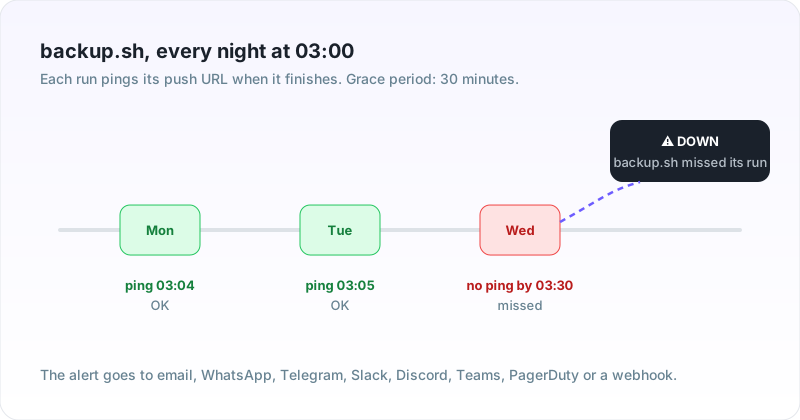
Cron job monitoring catches the failures nobody sees. A backup stops, an invoice run hangs, a sync never starts. Each job pings a unique URL when it finishes. If the ping does not arrive on time, UptimeClaw alerts you.
Last updated November 19, 2026
Cron does not tell you when something goes wrong. A server reboots at the wrong moment, a disk fills up, someone edits the crontab. Then the job simply does not happen, and nothing lands in your inbox. You find out weeks later, usually when you need the backup.
So turn it around. Instead of waiting for an error, expect a check-in. Every successful run pings UptimeClaw, and silence is the alarm.
Each job gets its own push URL. You set when the job should run and how late it may be. Then you add one line to the job.
&&.Want failures reported straight away? Send /fail or the exit code. See the API docs for the full push reference.
Everything a scheduled job needs to be watched.
UptimeClaw knows when the next run is due, including jobs that only run on weekdays or once a month.
A job that takes longer than usual still counts, until it passes the grace period you set.
Ping /fail or the exit code and the monitor goes down at once, without waiting for the schedule.
Send a short message in the request body, such as rows synced or a backup size, and see it in the check history.
Missed runs alert by email, WhatsApp, Telegram, Slack, Discord, Microsoft Teams, PagerDuty or a webhook.
The next successful ping closes the incident and sends a recovery message.
Three common approaches, and what each one catches.
| Approach | Job failed with an error | Job never ran | Works when the server is down |
|---|---|---|---|
| Cron's own email (MAILTO) | Only if the job printed output and mail delivery works | No | No |
| Log checks on the same server | Yes, if someone reads them | Not reliably | No |
| Push URL (heartbeat check) | Yes, with /fail or the exit code | Yes, the ping is missing | Yes, the alert comes from outside |
Cron mails a job's output to MAILTO only when there is output. See the crontab manual.
The usual reasons a check-in goes wrong.
| Symptom | Likely cause | Fix |
|---|---|---|
| Alert says late, but the job ran | Grace period shorter than the run, or a timezone mismatch | Raise the grace period, and set the timezone the server uses |
| No alert when the job failed | The ping runs even when the job fails | Join with &&, or send the exit code |
| The job hangs on the ping | No timeout on the request | Add -m 10 to curl so the ping never blocks the job |
| No curl in the container | Minimal image | Use wget -q -O- URL, or any HTTP client |
Yes. Push monitors are part of every plan, including the free one. Each scheduled job counts as one of your monitors.
Either a fixed interval, such as every 15 minutes, or a cron expression such as 0 3 * * *. Set the timezone your server uses.
Set the grace period to the longest normal run time. UptimeClaw only raises an alert once the ping is later than the schedule plus the grace period.
Yes. Call the push URL with /fail at the end, or with the exit code, such as /1. Anything other than 0 marks the monitor down straight away.
No. Anything that can make an HTTP request can ping it. That includes systemd timers, Kubernetes CronJobs, GitHub Actions and Windows Task Scheduler.
They go to the channels you choose, such as email, WhatsApp, Telegram, Slack, Discord, Microsoft Teams, PagerDuty or a webhook. A recovery message follows when the next successful ping arrives.
Cron job monitoring on the free plan. One line per job.
API monitoring · All features · WhatsApp alerts · Alert integrations · API docs