Real requests
Your method, headers and body
The check calls the endpoint the way your app does, so it fails when your app would.
A green homepage says nothing about your API. API monitoring calls the endpoint the way your app does, with the right method, headers and body. Then it checks that the answer is the one you expect. When it is not, you hear about it first.
Last updated November 19, 2026
Each check is a real HTTP request. UptimeClaw records the status code and the response time. With the keyword check, it also confirms the response contains the text you expect.
So a broken deploy that still answers 200 with an error page shows up as a failure. The same goes for an endpoint that returns 401 because a token expired.
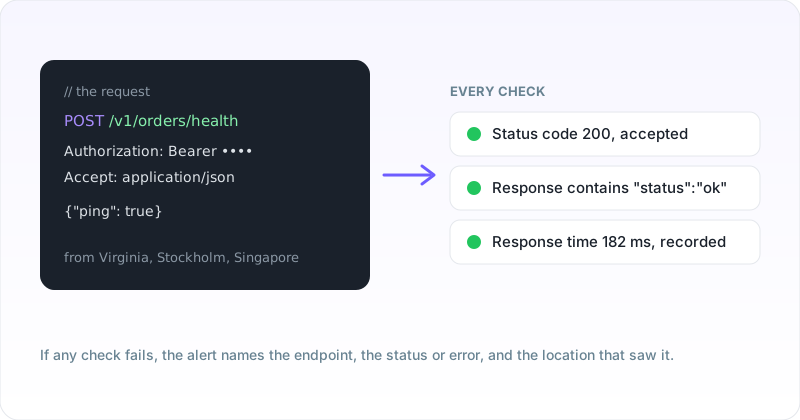
Every option on an HTTP check, with the failure it is there to catch.
| Setting | Catches | Example |
|---|---|---|
| Method | Endpoints that only answer one verb | POST /v1/orders/health |
| Request headers | Expired or rejected credentials | Authorization: Bearer ... |
| Request body | Validation errors on real input | {"ping": true} |
| Accepted status codes | Errors and unexpected redirects | 200-299, or 200,201 |
| Keyword in the response | A 200 that carries an error page | "status":"ok" |
| Response time | Slowdowns before they become outages | Recorded on every check |
Status code meanings follow the HTTP status reference.
Add an HTTP monitor with the endpoint URL, then open Advanced options.
Checks run from Virginia on every plan, and from up to six locations on paid plans. See where we check from.
Built for the endpoints your app calls.
The check calls the endpoint the way your app does, so it fails when your app would.
Require text in the response and catch the 200 that carries an error page.
See when an endpoint is getting slower, with history on each monitor.
Tell a regional problem from a global outage, with the location named in each alert.
HTTPS endpoints get a warning before the certificate lapses.
Failures alert by email, WhatsApp, Telegram, Slack, Discord, Microsoft Teams, PagerDuty or a webhook.
The usual reasons an API check fails when the API looks fine.
| Symptom | Likely cause | Fix |
|---|---|---|
| 401 or 403 on every check | Token expired, or headers are not valid JSON | Issue a fresh read-only token and check the JSON quotes |
| 405 Method Not Allowed | The endpoint does not accept that method | Match the method your app uses |
| Fails on a redirect | The URL answers 301 or 302 | Use the final URL, or add the code to accepted status codes |
| Keyword check fails after a deploy | The response wording changed | Update the keyword to text that stays stable |
| Timeouts from one location only | A regional network or CDN problem | Check the alert's location and the provider for that region |
Yes. Add request headers as JSON, for example an Authorization header with a bearer token. Use a read-only token made for monitoring.
Yes. Choose GET, POST, PUT, PATCH, DELETE or HEAD, and add a request body when the endpoint needs one.
With the keyword check, the response must contain a piece of text you choose, such as "status":"ok". It looks for the text in the response; it does not read individual JSON fields.
Every 5 minutes on the free plan, every 60 seconds on Solo, and every 30 seconds on Pro and Business.
From Virginia on every plan, and from up to six locations across the US, Europe and Asia on paid plans.
Yes. The UptimeClaw REST API creates, updates and pauses monitors, so they can live next to your deployment scripts.
API monitoring with real requests, free to start.
Cron job monitoring · Response time monitoring · SSL monitoring · Multi-region monitoring · API docs